
Skywave Schedules2.2.19 - Get APK
You'll be able to download in few seconds.
Publisher Description
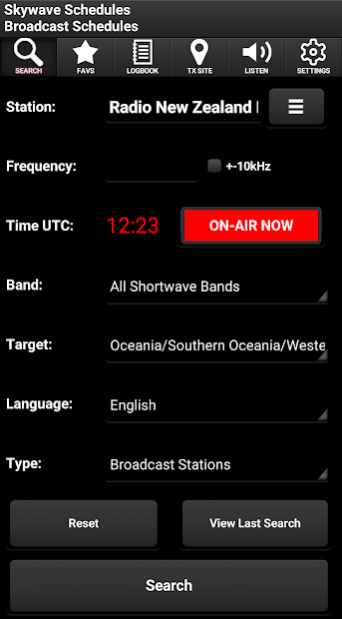
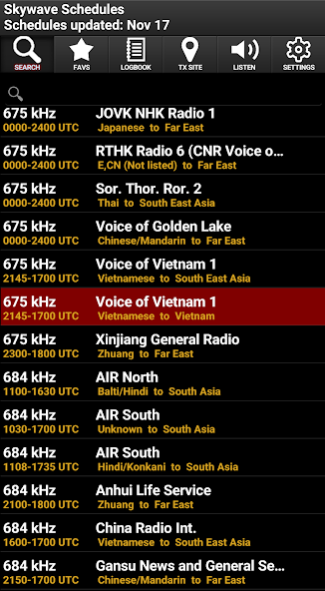
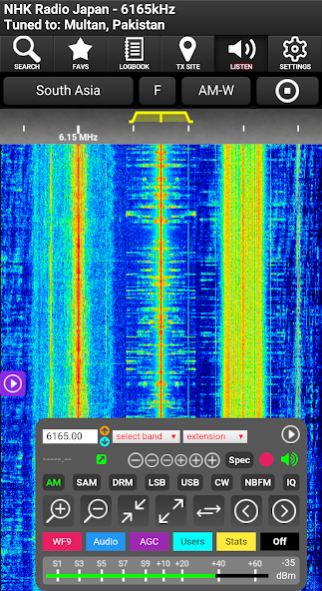
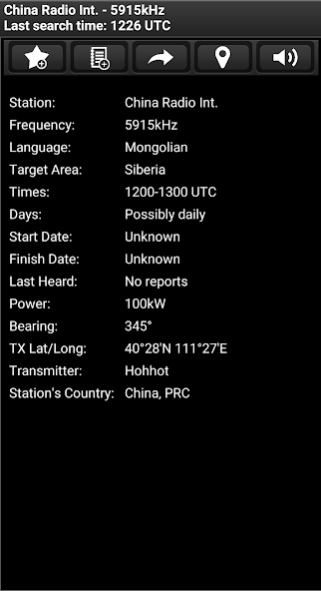
Ever wondered what it's like to listen to a real radio station on the other side of the world? with Skywave Schedules, you can, using KiwiSDR receivers on the internet. Connect to hundreds of remote radio receivers from the KiwiSDR network using the built in radio schedules or check a remote radio station is on air while you're trying to receive it with your own radio receiver.
Skywave Schedules was originally designed for use with portable shortwave radios, allowing you to easily find shortwave broadcast or utility stations by listing their frequency and broadcast times. In short, it lets you know what your listening to, or when to listen for a specific station or stations broadcasting in your language. You can also listen to remote receivers to see if the station you are trying to receive is actually on air.
Stations can be searched using Broadcast, Utility, both types or DRM (Digital Radio Mondiale stations).
The shortwave schedule broadcast seasons change at the end of March (to Season 'A') and October (to Season 'B') which can result in inaccurate listings being displayed until broadcasters publish their broadcast schedules or listeners locate what frequencies have changed. Use the 'Update Schedules' option in the apps 'Settings' to ensure you have the latest schedules. The app author is not responsible for accuracy of schedules, please consider this if you review the app.
Search for a station using any combination of the following, allowing you to filter your search to find or identify a station easily:
- Station Name
- Frequency (Option for +-10kHz)
- Time (On-Air Now, On-Air Next, Anytime or Specific)
- Band
- Target Area (Multiple Target areas can be selected)
- Language (Multiple Language areas can be selected)
- List Type i.e. Broadcast, Utility, (Broadcast & Utility) or Digital Radio Mondiale (DRM)
Key Features:
- Separate schedules for broadcast and utility stations or both
- Listen to shortwave stations on air right now direct from the schedules with the app automatically selecting a receiver based on the Target Area, with the option to manually enter a frequency or select a different receiver/region
- Station look-up as you type, helps you find your station easily
- Scrollable list of stations to browse
- Search for stations on-air now, on-air next, specific time or anytime
- Select a Band to search for stations (Longwave to 11m)
- Offline map to show station transmitter location as well as distance from your receiver if you set your Lat/Long in Receiver Location in Settings
- Can be used off-the-grid, not reliant on an internet connection when searching (once schedules have been downloaded)
- Search using any combination of Station, Frequency, Band, Time, Target Area, Language or Type of Broadcast
- Search for frequencies nearby using the +-10kHz option
- Add Favourites, and Log Broadcast and Utility stations
- Logbook feature with CSV & ADIF share options
- Utility filter, allowing you to move stations to the Utility list manually
- Get further useful information about a station, such as transmitter location, broadcaster's country, days on-air, target area and language
- Online schedules update, only updates if schedules are newer, no unnecessary updates required
Skywave Schedules will also work on Windows using Bluestacks too, but you need to create a new instance using the multi-instance manager and use Android Version 'Pie 64-Bit (Beta)' and ensure ABI Setting is 'ARM'.
Disclaimer: The app has the ability to tune to radio stations by SDR receivers around the world. The nature of radio propagation may result in a station not being received in the Target Area or the station is not currently on-air or may have changed their broadcast times, this is outwith control of the developer, please understand this when reviewing the app.
Skywave Schedules is free to use and advert free.
Enjoy listening to Shortwave!
About Skywave Schedules
The company that develops Skywave Schedules is Skywave Apps. The latest version released by its developer is 2.2.19.
To install Skywave Schedules on your Android device, just click the green Continue To App button above to start the installation process. The app is listed on our website since 2022-10-10 and was downloaded 0 times. We have already checked if the download link is safe, however for your own protection we recommend that you scan the downloaded app with your antivirus. Your antivirus may detect the Skywave Schedules as malware as malware if the download link to swbcdx.cap.shortwavelist is broken.
How to install Skywave Schedules on your Android device:
- Click on the Continue To App button on our website. This will redirect you to Google Play.
- Once the Skywave Schedules is shown in the Google Play listing of your Android device, you can start its download and installation. Tap on the Install button located below the search bar and to the right of the app icon.
- A pop-up window with the permissions required by Skywave Schedules will be shown. Click on Accept to continue the process.
- Skywave Schedules will be downloaded onto your device, displaying a progress. Once the download completes, the installation will start and you'll get a notification after the installation is finished.
Program Details
System requirements
Download information
Pricing
Version History
version 2.2.19
posted on 2022-10-10
- Added 'Unknown Region' (catches KiwiSDRs with no country specified)
- Added Android 13 Support
- Fixed some region split errors
- Manually filtered some KiwiSDRs to regions
version
posted on 2022-04-16
- Fixed EIBI language bug
version
posted on 2022-04-13
- Added Frequency Search Range (+-10kHz to +-100kHz)
- Fixed Reset bug
- Fixed SDR Receiver update bug
- Fixed some layout issues
version
posted on 2022-04-05
- Added Spanish translations (Thank you Osman Ramos!)
- Added pull refresh of stations search results
- Added Notify time
- Fixed Back button issue in Settings
- Fixed some access violation errors
version
posted on 2022-03-09
- Fixed layout issue
version
posted on 2022-02-05
- Fixed schedule version check bug
- Fixed download bug
version
posted on 2022-01-23
- Made Logbook SINPO Report selection better
- Fixed some translation issues
- Fixed time zone issue
- Fixed some visual issues
version
posted on 2022-01-11
- Added progress loading dialogs for Custom Stations, Favs, Logbook etc.
- Added Favs/Logbook add button
- Added some Russian translations
- Fixed SDR Tune bug in Favs/Logbook
- Fixed some GUI bugs
version
posted on 2021-12-30
- Fixed station details display bugs
- Fixed some minor layout issues
- Added new Logbook and Fav buttons
version
posted on 2021-12-25
- Added Custom Station Add/Edit/Delete, add your own station
- Added eQSL Report Setup & Send email from Logbook for reception reports
- Added 'Hide Station' (Long tap), see Settings for 'Hidden Broadcasts'
- Added option in Settings to toggle 'Target' for 'Country' in Search filter
- TX Site/Map tab removed and only now accessed via TX Site button in Station details
- Fixed 'Set Receiver Location' save bug
- Fixed TX Map bug
- Min Android version 6 with Android 12 support
Disclaimer
External Download
We do not host Skywave Schedules on our servers. We did not scan it for viruses, adware, spyware or other type of malware. This app is hosted by Galad and passed their terms and conditions to be listed there. We recommend caution when installing it.
The APK Download link for Skywave Schedules is provided to you by apps112.com without any warranties, representations or guarantees of any kind, so access it at your own risk.
If you have questions regarding this particular app contact the publisher directly. For questions about the functionalities of apps112.com contact us.
